64GB Voice Recorder: Noise Reduction, MP3, 24hr Run
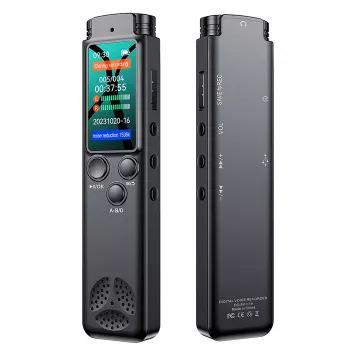
64GB Digital Voice Recorder with Noise Reduction and MP3 Player
Capturing clear audio during lectures, interviews, meetings, or personal notes often comes down to three things: enough storage, reliable battery life, and sound cleanup that makes voices easier to understand. This 64GB digital voice recorder pairs noise reduction with long continuous recording and adds MP3 playback for convenient listening on the go.
Who It Fits Best
- Students recording lectures and study sessions for later review
- Professionals documenting meetings, action items, and calls (where legally permitted)
- Writers and researchers capturing interviews and field notes
- Anyone who prefers spoken reminders over typing
If any of these sound familiar, a dedicated recorder can be simpler than relying on a phone—especially when organization and long sessions matter.
At-a-Glance Features and Specs
- 64GB storage for a large library of recordings and audio files
- Noise reduction designed to make speech clearer in everyday environments
- Up to 24 hours of continuous recording for long days, classes, or travel
- MP3 player function for quick playback without transferring files first
- Portable form factor suited to pockets, bags, and desk drawers
Quick Specs
| Feature | What it means for daily use |
|---|---|
| Storage (64GB) | Holds many hours of audio; reduces how often files must be cleared |
| Noise reduction | Helps voices stand out when there is background hum or room noise |
| Continuous recording (up to 24hr) | Supports all-day use without frequent charging interruptions |
| MP3 playback | Listen to recordings and music directly from the device |
| Portability | Easy to carry for classes, meetings, and interviews |
Sound Clarity: Using Noise Reduction Effectively
Noise reduction is most helpful when the background is steady—think air conditioning, a projector fan, or mild room hum. For the clearest speech, placement still does most of the heavy lifting.
- Place the recorder closer to the primary speaker when possible; distance affects clarity more than most settings.
- Avoid blocking microphones with hands, fabric, or a notebook cover.
- In meetings, position it near the center of the table to balance multiple voices.
- In lectures, a front-row seat or placement near the podium improves speech pickup.
- For interviews, keep the recorder between speakers or angle it toward the interviewee.
A practical habit: do a 10-second test recording, play it back, and adjust location before the real session starts.
24-Hour Continuous Recording: Planning Long Sessions
Long runtime changes how you plan your day. Instead of worrying about battery anxiety, the focus shifts to file organization and capture strategy.
- Use long recording for conference days, workshops, or back-to-back classes.
- Start with a full charge before critical sessions to maximize runtime.
- Create a routine to transfer and label files after long days to stay organized.
- If recording multiple sessions, pause between segments to make playback navigation easier.
For heavy-use weeks, consider a simple workflow: record, label by date/topic, back up, then clear only once you’ve confirmed the copy is safe.
MP3 Player Convenience and Playback Workflow
The built-in MP3 player function is more than a bonus feature. It supports fast verification (Did it pick up that quiet question?) and makes review easier when you’re away from a laptop.
- Use playback to quickly confirm a take, check audibility, or revisit key notes.
- Build a simple file naming habit (date + topic) to find recordings faster.
- Keep important recordings backed up to a computer or cloud storage when possible.
- For studying, replay difficult segments and take notes while listening.
When reviewing, try “passive first, active second”: listen once at normal speed to understand the structure, then replay only the dense segments while writing your summary.
Everyday Use Scenarios
Lecture capture
Start recording a few minutes early, then mark key time stamps in a notebook (or a notes app) so you can jump to the right moment later without scrubbing through the entire file.
Meeting notes
Place the recorder centrally; after the meeting, replay and convert highlights into action items. A quick “decisions + owners + due dates” list usually beats a word-for-word transcript.
Interview recording
Test audio level for 10 seconds before starting the full conversation. If possible, reduce friction by placing the device on a stable surface rather than holding it (handling noise can be surprisingly loud).
Personal reminders
Record short voice memos—errands, project ideas, or “don’t forget” moments—then review them during commutes or planning sessions so they don’t get buried under messages and notifications.
Recording Etiquette and Legal Considerations
Recording can be incredibly useful, but consent and responsible storage matter. Laws vary by state and situation, and workplaces and schools may have additional rules. For a starting point on U.S. considerations, review the U.S. Department of Justice guidance on recording conversations. For protecting saved files and personal data, the FTC’s privacy and security basics are a helpful reference.
Available Picks (In Stock)
- 64GB Digital Voice Recorder with Noise Reduction, MP3 Player, 24hr Continuous Recording — a compact, high-capacity option for day-long classes, interviews, and review on the go.
- Elegant Double-Layer Stainless Steel Necklace — a simple add-on if you’re also putting together a small, practical gift order.
FAQ
How many hours of audio can 64GB store?
It depends on the recording quality (bitrate) and file format. As a practical range, 64GB can hold many dozens to hundreds of hours of audio—higher-quality settings take more space, while voice-optimized settings store far more.
Does noise reduction remove all background noise?
No. Noise reduction can reduce steady ambient sounds and improve speech intelligibility, but it can’t fully remove loud, nearby noise sources; placing the recorder closer to the speaker usually makes the biggest difference.
Is it okay to record meetings or calls?
Rules vary by location and by workplace or school policy. When in doubt, get consent from participants and follow applicable local laws and organizational guidelines.










Leave a comment